Space Evolution
The transition from physical ink to digital pixels has redefined how product teams and executives think. In a traditional office, a whiteboard is limited by its physical borders; in the digital realm, the infinite canvas allows for non-linear exploration. For example, a fintech startup might use an infinite canvas to map a 50-step user journey, attaching real-time data API documentation directly to the nodes.
Recent industry data indicates that visual collaboration tools can reduce meeting times by up to 30% because participants process visual information 60,000 times faster than text. When a lead architect at a software firm can drag a pre-built UI kit onto a shared board during a live call, the need for a follow-up email disappears.
Breaking the Linear Limit
Unlike a slide deck, which forces a narrative into a sequence, a digital board allows for simultaneous workstreams. You can have a SWOT analysis in one corner and a high-fidelity prototype in the other, linked by logical arrows that maintain context as the project scales.
The Rise of Spatial Memory
Humans possess strong spatial memory. Teams using these tools often report "remembering" where an idea was placed on the map (the bottom-left quadrant) rather than just what the idea was. This cognitive anchor is vital for long-term strategic planning where details are easily lost in deep chat threads.
Bridging Time Zones
Asynchronous work relies on "persistence." A digital board acts as a living document that never gets erased. A developer in Tokyo can wake up and see the sticky notes added by a designer in London, complete with timestamps and nested comments, ensuring no loss of momentum.
Collaboration Issues
The most common failure in digital brainstorming is the "blank canvas syndrome," where teams stare at an empty grid without direction. Many organizations also suffer from tool sprawl, where a diagram is created in one app, but the tasks are managed in another, creating a "disconnect" that leads to outdated documentation and project drift.
Consider a marketing agency that uses a basic drawing tool for a brand strategy session. If that tool doesn't support vector scaling or high-resolution exports, the strategy becomes a blurry screenshot in a PDF, ignored by the execution team. This lack of integration results in "collaborative debt," where the energy spent ideating is wasted because the output isn't portable or actionable.
Strategic Tips
To maximize ROI on your visual tools, you must move beyond simple drawing. Integration is the gold standard. For instance, using Miro to sync with Jira allows you to turn a sticky note directly into a developer ticket. This eliminates manual data entry and ensures the "why" behind a task is always visible to the person doing the work.
For high-security environments, tools like Mural offer enterprise-grade permissioning and "Facilitator Superpowers" that allow a leader to summon all participants to a specific area of the board. This prevents the "lost in the woods" feeling common in large-scale virtual workshops involving 50+ participants.
Leveraging Smart Templates
Don't start from zero. Use frameworks like the Business Model Canvas or Service Blueprinting templates. Agencies using Lucidspark often find that starting with a structured container reduces "prep time" by 40%, allowing the team to dive straight into the problem-solving phase rather than formatting boxes.
Real-Time Voting Mechanisms
Avoid the "loudest voice in the room" bias by using built-in voting tools. FigJam allows for anonymous "stamp" voting and timers. This ensures that a junior developer's brilliant technical insight carries the same weight as a manager's suggestion, leading to more meritocratic decision-making.
Hybrid Hardware Integration
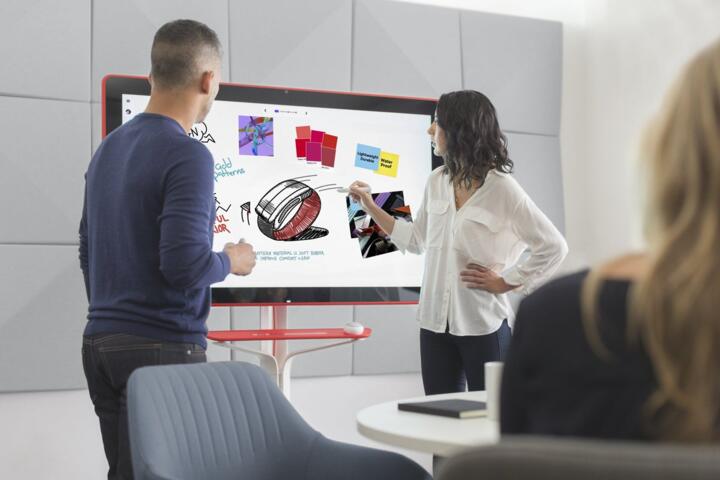
If you have a physical office, invest in hardware like the Vibe Board or Google Meet Series One. These devices allow you to draw on a physical screen that syncs instantly to the cloud. This solves the "whiteboard photo" problem, where someone takes a grainy picture of a board that is never looked at again.
Automated Diagramming Tools
For technical strategy, use Whimsical or Mermaid.js integrations. These allow you to turn text-based logic into flowcharts automatically. It’s perfect for architects who need to visualize a database schema without manually dragging 200 connectors, saving hours of tedious manual labor.
The Power of Widgets
Modern boards support embedded content. You can embed a live Google Doc, a YouTube video, or a Figma prototype directly onto the canvas. This creates a "Single Source of Truth" (SSOT) where a stakeholder can see the strategy, the assets, and the timeline in one singular view without switching tabs.
Success Stories
A global logistics company struggled with a 15% error rate in their warehouse sorting logic. They transitioned from static Visio diagrams to a collaborative Miro board. By allowing floor managers, software engineers, and data scientists to collaborate on a single "Infinite Flowchart," they identified three major bottlenecks in real-time. Within six months, the error rate dropped to 4%.
In another case, a mid-sized SaaS firm used FigJam to redesign their onboarding flow. They invited 10 real customers to a supervised session where users "moved" elements of the UI they found confusing. This direct visual feedback loop led to a 22% increase in trial-to-paid conversion because the team could visualize the friction points rather than just reading about them in a survey.
Strategic Evaluation
| Platform | Best Use Case | Key Strength | Integration Depth |
|---|---|---|---|
| Miro | Enterprise Strategy | Massive ecosystem of 100+ apps | High (Jira, Asana, Azure) |
| Mural | Guided Workshops | Advanced facilitator controls | High (Microsoft 365, Slack) |
| FigJam | Design/Product Teams | Seamless link with Figma design | Medium (GitHub, Slack) |
| Lucidspark | Process Engineering | Data-linked shapes and logic | Very High (Salesforce, AWS) |
| Whimsical | Fast Brainstorming | Speed and clean UI aesthetics | Low (Linear, Notion) |
Common Strategic Pitfalls
One major error is "Canvas Chaos." Without a clear structure or "frames," a board becomes a disorganized mess of icons and text. Always use a "Table of Contents" or a "Start Here" frame. Another mistake is ignoring the "Export Path." If the ideas stay on the board and never move into a task manager, the session was a failure.
Avoid over-complicating the board with too many colors or fonts. Treat your whiteboard like a piece of UI; it needs to be readable. Many teams forget to set permissions correctly, leading to "accidental deletions." Always lock your background templates so users only move the sticky notes, not the entire framework.
FAQ
Can I use these apps for free?
Most platforms like Miro and Lucidspark offer a "freemium" model with 3 editable boards. This is sufficient for small teams, but enterprise features like SSO and unlimited boards require a paid tier.
Is my data secure on a cloud board?
Major players like Mural and Miro are SOC2 Type II compliant. However, if you handle sensitive medical or government data, look for versions that offer "Data Residency" options to keep data within specific geographic borders.
Do I need a stylus or tablet?
While a stylus helps for freehand drawing, 90% of professional brainstorming is done with a mouse and keyboard using "Quick Add" shortcuts for sticky notes and connectors. A tablet is a luxury, not a requirement.
What happens if two people edit at once?
These apps use CRDT (Conflict-free Replicated Data Types) technology, allowing hundreds of people to see each other's cursors and edits in real-time with millisecond latency.
Can I turn a board into a presentation?
Yes, most professional tools have a "Presentation Mode" that treats frames like slides, allowing you to walk stakeholders through the board without them getting distracted by the surrounding "scratchpad" areas.
Author’s Insight
In my decade of consulting for remote startups, I’ve found that the tool matters less than the "rules of engagement." I always recommend appointing a "Board Gardener"—someone whose job it is to clean up the canvas after a session, grouping similar ideas and archiving old drafts. My personal favorite is Miro for its sheer scale, but for pure speed and focus, Whimsical is hard to beat. The biggest win you can have is moving your "Status Update" meetings into an asynchronous board format; your team will thank you for the reclaimed hours.
Summary
Choosing the right visual collaboration platform is a strategic decision that affects team velocity and clarity. Focus on tools that integrate with your existing stack, use templates to avoid the blank canvas trap, and ensure every brainstorming session ends with a clear transition to a task management system. The goal isn't just to draw together—it is to build a shared mental model that drives the project forward. Start by auditing your current workflow and identifying where "visual gaps" are causing delays, then implement a canvas-based solution to bridge them.