Systems of Thought
At its core, a personal knowledge management (PKM) system is split into two distinct mental modes. The first is the "active" mode, where information serves a specific objective, such as writing a report in Notion or coding a script in VS Code. The second is the "passive" mode, where information acts as a library for future discovery, such as a PDF whitepaper or a collection of CSS snippets in Obsidian.
Practitioners often cite the Pareto Principle in this context: 20% of your notes drive 80% of your current output. Research by Microsoft suggests that the average office worker spends about 1.5 hours a day looking for data. By categorizing information by its "actionability" rather than its "topic," users can reduce this search time by up to 50%, shifting from a librarian mindset to a creator mindset.
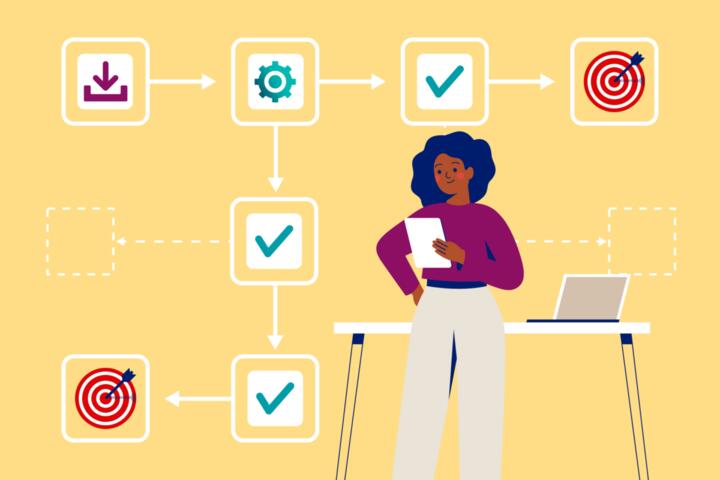
In practice, this means moving a contract from your "Inbox" directly to a "Project" folder if it needs signing, or to an "Archive" if it is merely for tax records. The goal is to keep the "Active" space lean. A bloated system leads to "collector’s fallacy," where the act of saving information is mistaken for the act of learning or producing.
The Psychology of Information Overload
Our brains are evolved for processing, not storage. When a digital workspace mixes "to-do" items with "nice-to-know" articles, the brain experiences decision fatigue. Every time you look at a list, your prefrontal cortex must decide: "Do I need to do something with this now?" If the answer is frequently "no," the system loses trust, and the user eventually abandons it for a simple paper list.
The PARA Framework Implementation
Tiago Forte’s PARA method (Projects, Areas, Resources, Archives) is the gold standard for this distinction. Projects are actionable and have a deadline. Resources are reference-based and ongoing. By strictly moving items between these categories based on their current utility, you maintain a "flow" state. This isn't just theory; users of these systems report a 30% increase in project completion rates due to reduced friction.
Distinguishing Assets from Trash
Not all reference material is created equal. Expert systems distinguish between "Active Reference" (data needed for a current project) and "Cold Storage" (data that might be useful in three years). Tools like Readwise help bridge this gap by resurfacing high-quality highlights from books, ensuring that reference material doesn't just go to die in a digital graveyard.
The Role of Metadata in Retrieval
Reference materials rely heavily on searchability. While actionable items should be prominent, reference items should be findable via tags or bi-directional links. In apps like Roam Research or Logseq, the "line" is blurred through links, but the "action" is still managed through specific TODO markers that separate a thought from a task.
Frequency of Access as a Metric
A simple way to define the line is the "Frequency of Use" metric. If you haven't touched a note in 30 days and it isn't part of an active project, it is reference material. Automated workflows in Zapier or Make.com can help move older files from active Slack channels to Google Drive archives, keeping the primary communication hub clean and actionable.
The Clutter Trap
The primary mistake users make is "categorical hoarding." This happens when you create a folder named "Marketing" and dump both your current campaign tasks and historical market research into it. Because the folder contains both "work" and "reading," you start to avoid it. The cognitive cost of filtering through the noise becomes too high, leading to procrastination.
This confusion leads to a "dead" system. When reference material invades actionable spaces, your task list grows to 500 items, 450 of which are actually just "things to read someday." This creates a psychological weight known as "Zeigarnik Effect," where unfinished tasks (even if they are just unread articles) occupy mental space and increase stress levels.
Real-world consequence: A freelance designer loses a client because a feedback email was buried under 20 "Reference" newsletters. The lack of a clear "Actionable" silo meant that urgent signals were lost in the noise. This isn't a productivity failure; it's a structural failure of the digital environment.
Building the Barrier
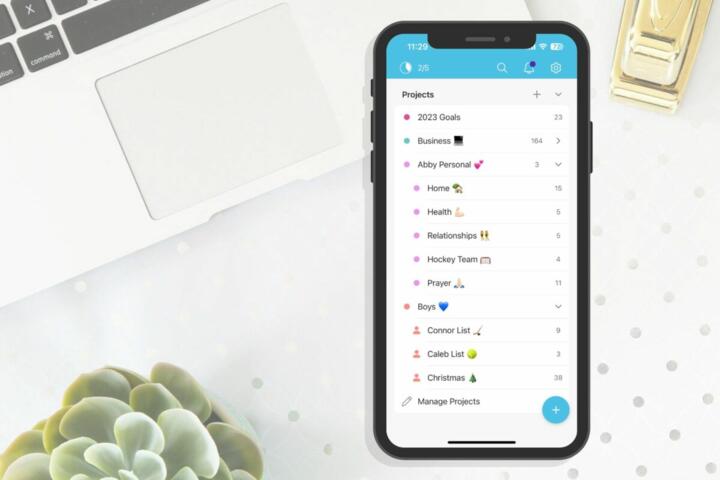
To fix this, you must implement a "Hard Edges" policy. Actionable items belong in a Task Manager (Todoist, Things 3) or a "Current Projects" folder. Reference items belong in a Knowledge Base (Evernote, Bear, Craft). Never let the two mix without a specific bridge. Use "Intermediary Packets"—small, bite-sized pieces of reference material—only when they are ready to be used in an active project.
When you encounter new information, ask: "What is the next physical action required?" If there is none, it is reference. If it supports a goal with a deadline, it is actionable. Using the "Two-Minute Rule" from Getting Things Done (GTD) helps: if it takes less than two minutes, do it; otherwise, file it as a task or reference immediately. Using Raycast or Alfred on macOS allows for rapid filing without breaking your work rhythm.
Data shows that developers who use a structured "Snippet Library" (reference) separate from their "Active JIRA Tickets" (actionable) resolve bugs 15% faster. The separation allows for deep focus on the problem at hand without the distraction of unrelated documentation. Tools like Heptabase are now even designing their entire UI around this visual separation of "whiteboard" (action) and "card" (reference).
Automating the Archive Process
Use "auto-archiving" features. In DevonThink or Google Drive, set rules to move files that haven't been opened in 6 months to an "Archive" tier. This keeps your local SSD fast and your mental space clear. For email, use "SaneBox" to automatically move newsletters (reference) out of your Inbox (actionable).
The Power of the Daily Review
The "line" isn't static; it's dynamic. A reference item today might become actionable tomorrow. A 5-minute daily review ensures that items are moved across the line as needed. During this time, you "promote" reference materials to project folders if a new goal arises, ensuring your "Second Brain" evolves with your career.
Context-Based Tagging Systems
Instead of tagging by "Subject," tag by "Context." Use tags like #to-read, #to-process (actionable) versus #research, #inspiration (reference). This allows you to filter your entire database based on your current energy levels. If you have 10 minutes, you filter by #to-read; if you are in deep work mode, you focus only on the #active-project tag.
Structuring Digital Workspaces
In Notion, create two top-level databases. One named "Action Hub" for tasks and active projects, and another named "Wiki" for permanent notes. Link them using Relation properties, but keep the views separate. This physical separation in the UI reinforces the mental separation in your workflow.
Managing the Physical-Digital Gap
Don't forget physical reference. Scan important documents using SwiftScan and immediately shred the paper. The digital version goes into your "Reference" system with OCR (Optical Character Recognition) enabled, making it searchable. This converts a physical "action" (cleaning the desk) into a digital "asset" (searchable reference).
Practical Transformations
A mid-sized marketing agency struggled with "information sprawl" across Slack and Google Drive. They implemented a "Project-Reference Split." All active project files remained in a dedicated "Active" folder with a 48-hour response SLA. All finished assets were moved to a "Library" folder. Within three months, they reduced "internal clarification" meetings by 22% because employees knew exactly where to find "live" data versus "historical" data.
A software engineer used a "Reference-First" approach for learning a new language (Rust). He kept his "Learning Notes" in Obsidian (Reference) but kept his "Coding Exercises" in a separate GitHub Repo (Actionable). By not mixing his "how-to" notes with his "must-fix" bugs, he avoided the overwhelm of seeing 50 unread syntax guides while trying to compile a simple program. He reached proficiency in 40% less time than his previous attempt at learning C++.
Systematic Comparison
| Feature | Actionable Information | Reference Information |
|---|---|---|
| Primary Goal | Completion / Output | Retrievability / Learning |
| Time Sensitivity | High (Deadlines) | Low (Evergreen) |
| Typical Tools | Todoist, Trello, Linear | Obsidian, Evernote, Zotero |
| Mental State | Execution / Focus | Exploration / Synthesis |
| Storage Location | "Project" Folder / Inbox | "Resources" / "Archive" |
Avoiding System Failure
The most common failure is "Over-Engineering." Don't spend 10 hours a week organizing your reference material. If it takes more than 30 seconds to file a note, your system is too complex. Use "Lazy Categorization": file it in a general "Reference" folder and rely on a strong global search (like macOS Spotlight or Raycast) to find it later.
Another pitfall is the "Actionable Mirage." This is when you treat a reference item as a task to feel productive. "Read 50 articles about AI" is not a task; it's a project or a resource. Rephrase it to "Summarize 3 AI trends for the Monday meeting." This turns a vague reference goal into a concrete actionable item with a clear "Done" state.
FAQ
Where do "Reading Lists" belong?
Reading lists are reference materials with an optional "Actionable" trigger. Store the list in your reference app, but put the specific book you are currently reading into your "Active Projects" or task manager to ensure you actually allocate time for it.
How often should I clean my reference folders?
Rarely. Unlike your task list, which should be cleaned daily, reference folders only need a "spring cleaning" once a year. The goal of reference is to be there when you need it, not to be perfectly manicured at all times.
Can one note be both actionable and reference?
Yes, but not at the same time. A "Project Brief" is actionable while the project is live. Once the project is finished, the brief becomes reference material for future "Lessons Learned." Use a "Drag-and-Drop" workflow to move it between folders.
What if I'm not sure if I'll need it later?
Follow the "10-dollar rule": if you can find the information again online in less than 2 minutes or for less than $10, don't save it. This prevents your reference system from becoming a mirror of the entire internet.
Which tool is best for beginners?
Start with Notion. It allows you to build a simple "Task" table and a "Notes" table in the same workspace. As you grow, you might move tasks to Todoist and notes to Obsidian, but Notion provides the best "all-in-one" experience for defining your line.
Author’s Insight
In my decade of optimizing digital workflows, I’ve found that the "Line" is less about the tools and more about the "Exit Criteria." I never finish my workday until my Inbox is empty—meaning everything is either scheduled as an action or filed as a reference. This simple habit of "deciding once" saves me hours of "re-deciding" the next morning. My best advice: be ruthless with your archive; if a note doesn't spark a future insight, delete it.
Summary
Defining the line between actionable and reference information is the difference between a system that serves you and a system you serve. By isolating tasks into dedicated execution environments and treating reference material as a searchable library, you protect your focus and reduce burnout. Start today by auditing your "Active" folders: move anything without a deadline into a "Resources" folder and feel the immediate mental relief. Productivity is not about having all the information; it is about having the right information available the moment you need to act.