Multi-Project System
A multi-hyphenate professional might be a designer-developer, writer-consultant, or marketer-founder. The challenge is not capability—it’s coordination. Managing different projects simultaneously requires more than time management; it requires workflow architecture.
According to a study by the American Psychological Association, task switching can reduce productivity by up to 40%. Meanwhile, freelancers on platforms like Upwork report handling an average of 3–5 active clients at once. Without a system, this quickly becomes unsustainable.
Real-world example: a content strategist running a blog, consulting clients, and managing social media campaigns needs distinct workflows for each role. Mixing them leads to missed deadlines and inconsistent quality.
Pain Points
Most multi-hyphenate professionals struggle not because they have too much work, but because they lack structure.
Common issues include:
- Blending all tasks into one to-do list
- Constantly switching between unrelated projects
- Underestimating time required per role
- Using too many disconnected tools
This leads to cognitive overload. You start a design task, jump to emails, then switch to writing—all within an hour. The brain never reaches deep focus.
In practice, this results in delayed deliverables, reduced income potential, and burnout. A freelancer might work 10 hours a day but only produce 4–5 hours of meaningful output.
Solutions
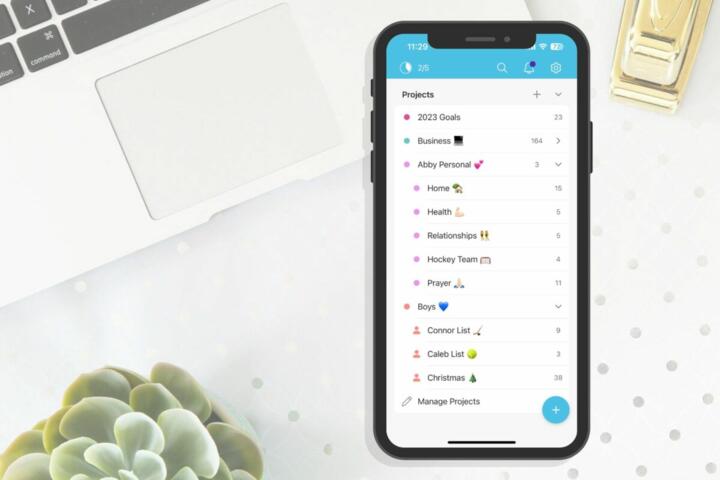
Segment Projects into Independent Work Streams
What to do: Treat each role or project as a separate “work stream” with its own tasks, deadlines, and workflows.
Why it works: Reduces mental switching costs and creates clarity.
In practice: Instead of one task list, create separate boards in tools like Notion, Trello, or Asana for each client or role.
Tools: Notion databases, Trello boards, Asana projects.
Result: Clear boundaries and up to 30% faster task completion.
Assign Fixed Time Blocks Per Role
What to do: Allocate specific time blocks to each work stream during the week.
Why it works: Prevents constant context switching.
In practice: Example schedule: Monday morning: Client A Monday afternoon: Content creation Tuesday: Product development
Tools: Google Calendar, Sunsama, Motion.
Result: Longer focus periods and improved output quality.
Use Context-Based Task Batching
What to do: Group similar tasks across projects.
Why it works: Reduces setup time and cognitive load.
In practice: Batch all writing tasks together, even if they belong to different clients.
Tools: Todoist labels, ClickUp tags.
Result: 20–40% efficiency gain in repetitive tasks.
Build a Central Command Dashboard
What to do: Create a single overview of all projects, deadlines, and priorities.
Why it works: Eliminates the need to check multiple tools constantly.
In practice: Use a Notion dashboard showing weekly priorities, deadlines, and progress.
Tools: Notion, Airtable, ClickUp dashboards.
Result: Better decision-making and reduced stress.
Set Clear Output Metrics for Each Role
What to do: Define measurable outcomes per project.
Why it works: Keeps focus on results, not activity.
In practice: Writing: 1500 words/day Consulting: 3 client calls/day Development: 1 feature/week
Tools: Google Sheets, Habit trackers.
Result: Higher accountability and consistent progress.
Automate Repetitive Workflows
What to do: Automate recurring tasks across projects.
Why it works: Saves time and reduces manual errors.
In practice: Automate client onboarding emails, invoice generation, and task creation.
Tools: Zapier, Make (Integromat), HubSpot.
Result: Save 5–10 hours per week.
Use “Shutdown Rituals” Between Work Streams
What to do: End each work block with a short review and reset.
Why it works: Clears mental residue from the previous task.
In practice: Write down what’s done, what’s next, and close all related tabs.
Tools: Simple checklists or journaling apps.
Result: Faster transitions and reduced mental fatigue.
Case Studies
Case 1: Freelance Designer-Developer
Problem: Managing 4 clients led to missed deadlines and stress.
Solution: Implemented time blocking and separate Trello boards for each client.
Result: Project delivery speed improved by 35%, and client satisfaction increased.
Case 2: Content Creator + Consultant
Problem: Mixing content creation with client work caused inconsistent publishing.
Solution: Dedicated mornings to content and afternoons to consulting.
Result: Published 3x more content and increased consulting revenue by 25%.
Tool Comparison
| Tool | Best For | Key Feature | Price |
|---|---|---|---|
| Notion | All-in-one workspace | Custom dashboards | Free / Paid |
| Trello | Visual task management | Kanban boards | Free / Paid |
| Asana | Team collaboration | Project timelines | Free / Paid |
| ClickUp | Advanced workflows | Custom views | Free / Paid |
| Todoist | Task management | Simple interface | Free / Paid |
Common Mistakes
Mistake 1: Treating all tasks equally.
Fix: Prioritize based on impact and deadlines.
Mistake 2: Overloading your schedule.
Fix: Limit active projects to a manageable number (3–5).
Mistake 3: Ignoring rest and recovery.
Fix: Schedule breaks and non-work time.
Mistake 4: Using too many tools.
Fix: Consolidate into one or two primary systems.
Mistake 5: Lack of planning.
Fix: Review and plan weekly.
FAQ
How many projects can I manage at once?
Most professionals handle 3–5 effectively, depending on complexity.
Is multitasking the same as multi-hyphenate work?
No. Multitasking splits attention; this workflow structures it.
What’s the best tool for managing multiple projects?
Notion or ClickUp are popular for their flexibility.
How do I avoid burnout?
Use time blocks, limit workload, and schedule recovery time.
Can this work for full-time employees?
Yes, especially those handling multiple roles or side projects.
Author’s Insight
I’ve managed multiple roles—writing, consulting, and product building—at the same time. The biggest shift came when I stopped trying to “balance” everything daily and started structuring my week by roles. Separating work streams and reducing context switching made my days calmer and more productive. The key is not doing more, but designing how you do it.
Summary
The multi-hyphenate workflow is about structure, not hustle. By segmenting projects, controlling your time, and using the right tools, you can handle multiple roles without losing focus. Start by organizing your work streams and scheduling dedicated blocks. Small structural changes lead to significant productivity gains.