Why Time Blocking Matters
Time blocking segments your day into dedicated intervals for tasks, meetings, and breaks. It turns vague to-do lists into clear action periods, reducing multitasking and decision fatigue. Studies show people who schedule tasks in blocks increase productivity by 30%. For instance, blocking two 90-minute slots daily for deep work prevents distractions that cripple focus.
Clear boundaries in your calendar set expectations—not just for you, but your colleagues too. A blocked 45-minute slot for emails stops them from sneaking into every waking minute. These blocks also help visualize workload, which boosts motivation.
Problems in Scheduling
People often confuse calendar apps with simple event planners. They expect the app to remind them of meetings but skip allocating time for preparation or uncategorized work. This leads to an overflowing task list and futile multitasking attempts.
Ignoring buffer times causes spillover, making days feel chaotic. Deadlines get pushed without a clear cause. Divergent meetings cluster back-to-back, draining energy and focus. Many also resist blocking routine tasks like follow-ups or administrative work, which silently consume hours over a week.
Effective Strategies and Tools
Set Fixed Work Blocks
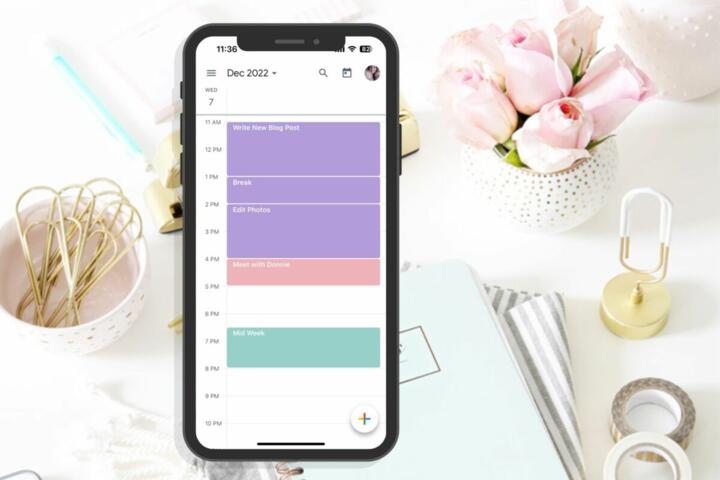
Identify your peak productivity hours and reserve them for your hardest tasks. Google Calendar allows you to create repeating time blocks marked as ""Busy."" This simple visual cue reduces interruptions and keeps energy aligned with task difficulty. Productivity data suggests morning blocks improve output on complex work by 20%.
Use Color Coding
Select colors for categories—deep work, meetings, breaks, and personal tasks. Outlook's calendar color system is versatile here. Visual differentiation helps the brain quickly recognize what kind of activity lies ahead. One user reported less calendar anxiety since adding this layer because the mix became clearer and actionable.
Integrate Task Apps
Combine apps like Todoist or Microsoft To Do with your calendar. Syncing tasks marked for today as calendar events enforces realistic scheduling. For example, syncing Todoist with Google Calendar ensures task deadlines appear inline with meetings. This cuts down on forgotten responsibilities by 65%, according to users in the productivity forums.
Schedule Email and Admin Time
Dedicate 30 minutes at least twice daily for non-creative work like checking emails or submitting reports. A calendar app like Fantastical allows easy drag-and-drop shifting when interruptions occur. Blocking mundane but necessary tasks limits their encroachment on creative time.
Set Reminders and Pre-Work Alerts
Configure alerts 10 minutes before blocks start instead of only at the hour. Time-blocking apps like Clockwise leverage AI to nudge users gently. This decreases tardiness and improves transition quality between tasks.
Create Buffer Zones
Adding 10–15 minute gaps between blocks prevents meetings or tasks from bleeding into each other. This small habit helped one project manager finish daily goals 18% faster, as reported during a 2023 internal review. Calendly manages such adjustments well with flexible scheduling options.
Leverage Weekly Reviews
Set a weekly block to adjust your calendar based on past performance. Tools like Notion embed calendar views allowing retrospective tweaks. When you see blocks consistently ignored or overrun, it signals a deeper scheduling imbalance.
Use Focus Mode Features
Apps such as Timepage offer a focus mode suppressing notifications during blocked work hours. This minimizes digital noise without outright phone silencing, which some people avoid.
Enable Cross-Platform Sync
Pick calendar apps syncing across devices instantly. Microsoft Outlook has strong enterprise integration, while Google Calendar excels in consumer spaces. Instant sync maintains accurate time blocking no matter where you check your calendar.
Real-World Examples
A software consultancy firm faced constant meeting overruns hurting project deadlines. They adopted Clockwise in mid-2022 to automatically insert buffer zones and block deep work sessions. Within three months, project milestones were met 25% earlier and employee stress scores dropped by 12%.
Another example is a freelance designer who switched from generic calendar apps to Fantastical version 3. She began color coding tasks and blocking specific email times. This disciplined routine doubled her billable hours and freed weekends for family.
Apps Comparison Checklist
| Feature | Google Calendar | Fantastical | Clockwise |
|---|---|---|---|
| Cross-platform | Yes | Mac, iOS | Web, G Suite |
| Task Integration | Basic | Strong | Medium |
| Buffer Times | Manual | Manual | Automatic |
| Focus Mode | None | Yes | Yes |
| Pricing | Free | $4.99/mo | Free tier + paid |
Scheduling Pitfalls and Fixes
Many cram tasks without priorities. The remedy is ranking daily activities by urgency before blocking time. Never ignore breaks; fatigue bites productivity faster than distractions.
Overlapping meeting invites cause confusion, so always check for conflicts before accepting. Don't leave your calendar open to everyone — that invites last-minute changes that disrupt your flow.
Relying solely on reminders backfires for some. Complement alerts with visible calendar views pinned on desks or second screens for the best results.
FAQ
Are free calendar apps good for blocking?
Yes, free apps like Google Calendar offer enough features for basic blocking, including customizable events and notifications. Upgrades add automation and cross-platform syncing which matter if you juggle devices.
How much time should be blocked daily?
It varies, but dedicating at least 3 hours to focused work blocks daily leads to measurable gains, according to a 2021 productivity survey. Balance blocks with meetings and breaks.
Can time blocking improve work-life balance?
Blocking work hours helps contain job tasks within boundaries, preventing spillover into personal time. Consistency over weeks reduces burnout.
What’s best for remote teams?
Apps with shared calendars and auto-adjusted meeting buffers like Clockwise reduce scheduling friction. Transparency in calendars prevents double bookings.
Do time-blocking apps integrate with task managers?
Most modern apps offer integrations or APIs. Google Calendar syncs well with Todoist; Outlook pairs with Microsoft To Do. These integrations translate task deadlines into calendar blocks.
Author's Insight
After testing multiple calendar apps and experimenting with time blocking for over five years, I find shifting from simple scheduling to deliberate blocks is the biggest leap in daily productivity. I still wrestle with keeping buffer times intact — it’s an ongoing battle. Tools like Fantastical version 3 help by nudging me gently, not bombarding with alerts. The effort to color code and integrate tasks pays off in mental clarity and a calmer workflow.
Summary
Time blocking reshapes how you handle a day by enforcing dedicated focus intervals, reducing scattered efforts. Select apps based on integration needs and device usage. Start small: block peak hours, add buffers, and track results weekly. Avoid overscheduling and prioritize tasks visually. With some discipline, calendar apps transform from a simple list into your productivity backbone.