Calendar Apps And Health
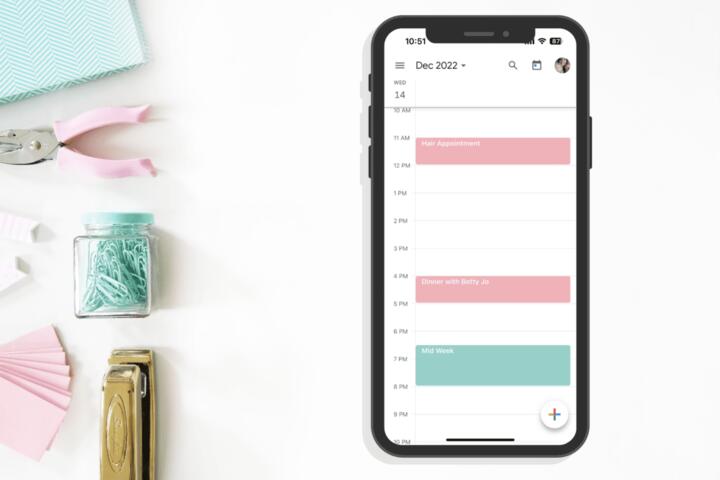
A calendar app becomes part of your health routine when it stores appointment dates, medication schedules, symptom check-ins, and follow-up tasks. A missed dose reminder or a shifted appointment time can create real friction, especially when you travel or share schedules with caregivers. The app also acts as a “system of record” for recurring events, so the details of recurrence rules and time-zone behavior matter. If you use multiple devices, the sync method determines whether changes appear quickly or arrive late. Even the notification engine matters; a reminder that fires at the wrong local time defeats the purpose.
Practical example: a medication event set to repeat every 24 hours can drift if the app interprets it as “same clock time” versus “same interval.” Another example: a clinic appointment saved in one time zone can display differently after a trip if the app stores events as floating local times instead of absolute timestamps. These differences show up in daily use, not in marketing pages.
Common Pain Points
People often judge a calendar app by its interface and ignore the mechanics behind recurring events, time zones, and notifications. Recurrence rules vary: some apps treat “every month on the 15th” differently from “every 30 days,” and the difference becomes visible when months have different lengths. When you add exceptions to a series, some apps generate new event instances while others edit the series, which changes how future occurrences behave.
Time-zone handling is another frequent failure point. Events can be stored as absolute moments (with a time zone reference) or as “floating” times that follow your device clock. If you travel, floating times can shift relative to the clinic’s local time. If you share calendars, the app’s permission model affects whether others can see details, edit events, or view only free/busy status.
Sync reliability also gets overlooked. Calendar apps typically sync using protocols like CalDAV or vendor-specific APIs, and the app’s background sync policy affects latency. On Android, battery optimization settings can delay sync; on iOS, Low Power Mode can change background behavior. I once tested a calendar app on iOS 17.6 and noticed reminders arrived late only when the device had been idle for hours—an issue that looked like “network lag” but was actually background throttling.
Finally, privacy and data portability get treated as afterthoughts. If the app stores sensitive health-related notes inside event descriptions, those notes may be included in exports, shared views, or backups. If the app does not support export to a standard format like iCalendar (.ics), switching later can require manual cleanup.
What To Check Before You Commit
Time Zones And Recurrence
Check how the app treats recurring events and time zones before you rely on it. Create a test event that repeats monthly, then edit one occurrence and confirm whether the rest of the series stays intact. If the app offers options like “event time zone” or “use device time zone,” test them by temporarily changing your device time zone and observing how the event displays. A reliable app keeps the appointment’s intended moment consistent with the clinic’s local time, or it clearly documents when it uses floating times.
For medication schedules, prefer recurrence patterns that match your intent. If your intent is “same clock time,” choose a recurrence that anchors to local time. If your intent is “every 24 hours from the start,” choose interval-based repetition if the app offers it. Many apps label these choices in plain language, but some hide the behavior behind recurrence templates.
Notifications That Don’t Drift
Verify notification timing using a short trial window. Set a reminder for 10 minutes from now, then check whether it fires on time after you restart the phone and after you toggle Do Not Disturb. On Android, notification channels can block reminders if the channel is disabled; on iOS, Focus modes can silence certain alerts. If the app supports “remind me before” with multiple offsets, test at least two offsets so you can see whether the app schedules both correctly.
Also check whether the app supports offline reminders. Some apps queue notifications locally, while others depend on server-side scheduling. If you travel to a low-connectivity area, local scheduling behavior matters more than the UI.
Privacy, Sharing, And Exports
Look for controls that separate “calendar visibility” from “event details.” If you share a calendar with family or a caregiver, confirm whether they can see event titles and notes or only free/busy. If the app supports per-event privacy settings, test them by sharing a single event and checking what the other account sees. For health-related notes, consider using a generic title and storing sensitive details in a separate secure system rather than in the event description.
Data portability deserves a concrete check. Confirm whether the app exports to .ics and whether it includes recurring rules and reminders. If you rely on a clinic portal that accepts iCalendar invites, verify that the app can import .ics without losing recurrence structure. I’ve seen apps import a series but drop exceptions, which creates a “looks fine today, wrong next month” problem.
Sync Speed And Reliability
Evaluate sync behavior across devices. Add an event on your phone and confirm when it appears on your laptop or tablet. Then edit it on the second device and confirm whether the first device updates quickly. If the app supports multiple calendars, confirm whether it syncs all of them or only selected ones.
Check background sync settings on your operating system. On Android, battery optimization can delay sync; on iOS, background refresh settings can affect updates. If the app offers a manual “sync now” button, test it and note how long it takes. A calendar app that takes minutes to propagate changes can still work, but it changes how you plan last-minute updates.
Case Examples For Real Use
Caregiver Shared Schedule
Scenario: A caregiver shares a calendar with a family member to coordinate appointments. The caregiver creates events with detailed notes about symptoms and medication changes. After sharing, the family member sees the notes on every event, not just the ones marked private. The caregiver fixes this by switching to generic event titles and using the app’s per-event privacy setting for details, then exports the calendar to .ics to confirm the shared view matches what they intended.
Lesson: sharing controls often apply at the calendar level, not the note level. Testing one event before you add sensitive content prevents a lot of cleanup later.
Travel And Appointment Times
Scenario: A patient schedules a follow-up appointment while in one time zone, then travels before the appointment. The calendar displays the appointment time correctly on the patient’s phone but shows a different time on a shared caregiver device. The difference comes from one device treating the event as floating local time while the other anchors it to the original time zone. The patient resolves the mismatch by enabling the app’s “use event time zone” behavior for imported clinic events and re-importing the appointment .ics file.
Lesson: time-zone behavior can differ across devices and import sources, so a quick test after travel reduces surprises.
Comparison Checklist
| Feature To Verify | What To Look For | Test You Can Run | Why It Matters |
|---|---|---|---|
| Recurrence behavior | Monthly vs interval rules; exception handling | Edit one occurrence; confirm future dates | Prevents “series drift” |
| Time-zone anchoring | Event time zone vs floating local time | Change device time zone; compare display | Avoids appointment-time mismatches |
| Notification reliability | Multiple offsets; Focus/Do Not Disturb behavior | Set reminders 10 min and 1 hour ahead | Reduces missed tasks |
| Sharing controls | Free/busy vs details; per-event privacy | Share one event; verify what others see | Limits accidental disclosure |
| Export/import | .ics support; recurrence and reminders preserved | Export then re-import; compare series | Reduces lock-in |
Common Mistakes To Avoid
People often add health-related details to event titles and descriptions without checking how sharing works. If you share a calendar for coordination, treat event text as visible to anyone with access. A safer pattern uses a neutral title and stores sensitive details elsewhere.
Another mistake involves trusting recurrence without testing exceptions. If you cancel one appointment in a series, confirm whether the app cancels only that occurrence or changes the whole series. This issue becomes visible when you return months later and the schedule no longer matches the clinic’s plan.
Some users also ignore notification settings at the operating-system level. A calendar app can be configured correctly yet still fail if notification channels are disabled or Focus modes block alerts. A quick check in the phone’s notification settings prevents hours of troubleshooting.
Finally, people switch apps without exporting first. Even if the new app imports .ics, it may not preserve every reminder offset or custom field. Exporting before migration gives you a fallback copy you can compare against after import.
FAQ
Do Calendar Apps Support Time Zones Reliably?
Many apps support time zones, but behavior differs for recurring events and imported invites. Test by changing your device time zone and checking whether the event time stays anchored to the original location or shifts with local time.
How Can I Stop Medication Reminders From Drifting?
Use recurrence patterns that match your intent: “same clock time” for dosing schedules tied to local time, or interval-based repetition for fixed elapsed time. Then verify the next occurrence after a device restart and after a time-zone change.
What Privacy Settings Should I Check?
Check whether shared calendars reveal event titles, descriptions, and attachments or only free/busy. Confirm per-event privacy options and test with a second account so you see what others actually receive.
Will .ics Exports Preserve Recurring Events?
Some apps preserve recurrence rules and exceptions in .ics, while others simplify series during export or import. Export a small test series, re-import it, and compare the next few occurrences.
Do Offline Modes Affect Reminders?
Offline behavior depends on how the app schedules notifications. Some apps queue reminders locally, while others rely on server-side scheduling, which can delay alerts when connectivity is limited.
Author's Insight
Calendar apps look similar on the surface, but the reliability differences come from recurrence rules, time-zone anchoring, and notification scheduling. Those behaviors depend on how the app represents events internally and how it syncs across devices. A careful evaluation uses small tests: one recurring series with an exception, one travel/time-zone check, and one notification trial under Do Not Disturb or Focus. Export and import tests to .ics reduce lock-in risk because they reveal what the app actually preserves.
For health-related use, treat the calendar as a coordination tool rather than a secure medical record. If you store sensitive details in event notes, verify sharing and backup behavior before you add more content.
Key Takeaways
- Test recurrence and time-zone behavior with a small series and an edited exception before trusting it for appointments.
- Verify reminders under your phone’s notification and Focus/Do Not Disturb settings, not just inside the app.
- Check sharing permissions and run a one-event test to confirm what others can see.
- Export and re-import a test calendar to confirm .ics preserves recurring events and reminder offsets.
- Keep event text neutral when sharing; store sensitive health details in a separate, more controlled place.